Run a Christmas Tree Lot Beginner Guide: Start Strong
Run a Christmas Tree Lot beginner guide: learn how to stock trees, serve customers, hire workers, and spend your cash on upgrades that keep sales moving.

How to Start Selling Christmas Trees
An empty lot earns nothing, even with customers waiting outside. This Run a Christmas Tree Lot beginner guide walks you through stocking your business, completing sales, and putting your earnings toward useful upgrades. Start by learning the full order-to-delivery loop before taking on more customers.
1. Order trees and put them on display
Launch Run a Christmas Tree Lot on Roblox, then use your lot’s computer to order trees.
Your opening routine is:
- Choose trees and add them to your order.
- Place the order and wait for the delivery truck.
- Collect the delivered trees.
- Place them around your lot for customers to browse.
Order a small mix of available varieties rather than filling the entire space with one species. Group matching trees together and leave yourself room to move between displays, the register, and customers’ cars.
2. Finish the sale by loading the customer’s car
Once a customer selects a tree, handle checkout and bring the purchased tree to their car. Completing checkout is only part of the job; keep track of the loading task too.
Stay nearby while learning this routine. Before ordering another shipment or browsing decorations, finish serving customers who are already waiting.
Manage Stock and Cash Before Expanding
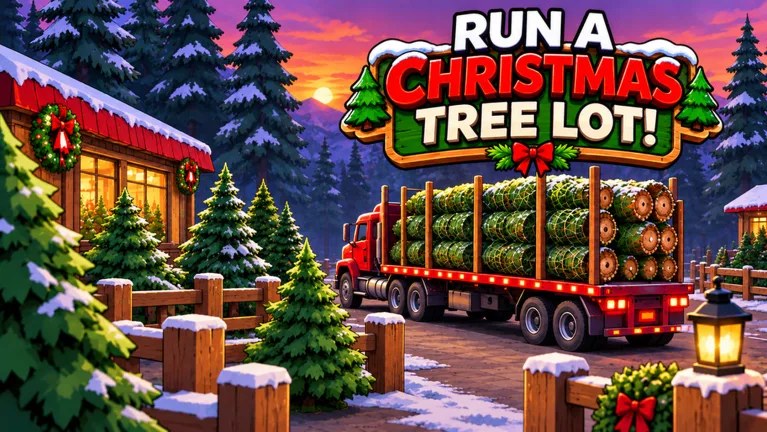 Image: Roblox / Mr. Grinchmas
3. Reorder before your displays run empty
Deliveries take time, so place another order while you still have trees available to sell. Waiting until the last tree disappears leaves you dependent on the next truck.
Check the demand information in Tree Supply when choosing your next shipment. Give more space in your order to trees marked as being in demand, while keeping a selection of other varieties.
Avoid buying a huge quantity simply because you can afford it. Keep enough cash available for another restock instead of tying your entire balance up in trees that are still sitting on display.
4. Watch customer reactions when changing prices
Tree prices can be adjusted, and customers can object when they find them too expensive. Resist raising every price immediately after a few successful sales.
Make a small adjustment, then watch whether shoppers continue buying or complain. Likewise, avoid dropping everything to the minimum just because sales slow down. Check your selection and customer service before making another price change.
5. Claim quest rewards as you go
Quests include objectives tied to selling trees, including specific varieties. Open the quest menu while planning your next order so you can stock trees that also help complete an objective.
Claim completed rewards before making your next purchase. Keep an eye on these objectives during normal business rather than buying a large shipment solely to chase one task.
Hire Workers to Handle Your Busiest Tasks
6. Hire for the job that keeps pulling you away
Workers can help with checkout, carrying purchased trees, and stocking the lot. Choose your next employee around the work that is holding up sales.
- Customers waiting at checkout: Hire a cashier and handle loading yourself.
- Purchased trees waiting to reach cars: Hire a worker to help carry them.
- Deliveries piling up: Add stocking help so incoming trees reach the displays.
Watch the worker complete their assigned job before moving on to another project. Hiring help gives you more time to manage inventory, but keep checking the register and delivery area.
7. Check breaks and seating before replacing an idle worker
Employees take breaks. If someone stops working, check their status and resting area before spending money on another hire.
Provide seating for your growing staff and keep the resting area accessible. When a queue develops, cover the unattended task yourself while checking whether the employee is resting or having trouble reaching their station.
Choose Upgrades Around Your Current Needs
8. Compare parking, lot space, and headquarters requirements
Run a Christmas Tree Lot lets you upgrade parking, expand the lot, and improve the headquarters. Some progression requirements involve both cash and reputation, so a large cash balance alone does not cover every upgrade.
Inspect the next upgrade’s requirements before placing a big inventory order. Then choose the purchase that addresses your current problem:
- Expand the lot when your displays need more room.
- Upgrade parking when you are ready to handle more arriving customers.
- Work toward headquarters improvements while keeping the business stocked and staffed.
Leave space around areas you plan to expand. Avoid spending heavily on a decorative arrangement you will want to rebuild after your next major upgrade.
Use Codes to Fund Stock and Staff
9. Redeem cash rewards before planning big purchases
Open Menu on the right side of the screen, select Codes, and enter a code exactly as written.
Try these rewards:
| Code | Reward |
|---|---|
| IMBROKE | $25,000 Cash |
| BUDDYTHEELF | $10,000 Cash |
| SNOWBALL | $10,000 Cash |
| HOHOHO | 4,000 Reputation |
| JINGLEBELLS | 1,000 Reputation |
| MISTLETOE | 2x Cash for 30 minutes |
| NICELIST | 2x Reputation for 10 minutes |
| OGTICKET | OG Golden Plaque |
Codes expire, so use the in-game response to see whether a reward is still available.
Put cash rewards toward a manageable inventory order and workers before spending heavily on decorations. For timed boosts, stock the lot and get ready to serve customers before redeeming them. Avoid using part of a short boost while waiting for your first delivery.
Understand the Paid Passes Before Spending Robux
10. Match a pass to the mechanic you want to change
Learn the business routine before choosing a paid upgrade. The passes affect different parts of the operation:
- 2x Cash — 99 Robux: Doubles the profit on every tree sold.
- 2x Reputation — 79 Robux: Doubles reputation earned from happy customers.
- Instant Delivery — 149 Robux: Makes the supplier truck head out immediately after an order.
- VIP — 199 Robux: Customers pay up to 15% more and leave happier reviews; includes a gold VIP chat tag.
- First Frost — 299 Robux: Unlocks the premium reward row, including decorations, longer cash and reputation boosts, and the Light-up Tree Tunnel at tier 20.
Instant Delivery changes when the truck departs; plan your restocking around that distinction. For First Frost, inspect the reward track before buying—the premium rewards for tiers you have already reached unlock immediately.
Continue with
 Run a Christmas Tree Lot FAQ: Codes, Passes & Beginner TipsRun a Christmas Tree Lot FAQ covering codes, cash, reputation, workers, and game passes. Learn how to redeem rewards and get your Roblox business growing.
More in Guide
Run a Christmas Tree Lot Tycoon: Beginner Tips & Codes
Build your Run a Christmas Tree Lot tycoon with tips on stocking trees, hiring workers, and upgrades. Explore cash codes, Reputation rewards, and passes.
Run a Christmas Tree Lot Walkthrough: Start Selling
Use our Run a Christmas Tree Lot walkthrough to stock trees, finish sales, hire workers, and plan upgrades while keeping cash ready for your next delivery.
Continue exploring
Join the community
Official channels for news, updates and player help: