Run a Christmas Tree Lot Tree Types: Stocking Guide
Explore Run a Christmas Tree Lot tree types, learn which trees to order, and use demand, stock organization, and delivery tips to keep your lot selling.
Jump to

Which Tree Types Can You Stock?
An empty display won’t earn you any cash. Run a Christmas Tree Lot tree types include Siberian Fir, European Silver Fir, and Swiss Stone Pine, giving you several varieties to order and sell. Pay attention to demand before filling your lot with another shipment.
Look for these names while building your inventory:
- Siberian Fir
- European Silver Fir
- Swiss Stone Pine
Keep each species together when arranging your display. Separate rows make it easier to track what you have, find a particular tree, and spot which section needs another order.
Trees also come in different sizes. Leave enough room around larger trees when placing them, and keep a clear route through the middle of your display. Expand the lot when you need more space rather than squeezing every delivery into the same crowded corner.
Official page: Run a Christmas Tree Lot (roblox.com)
How to Order and Stock Your Trees
Use the computer to purchase inventory, then place the delivered trees around your lot. The basic sales loop takes you from ordering stock to loading a customer’s purchase:
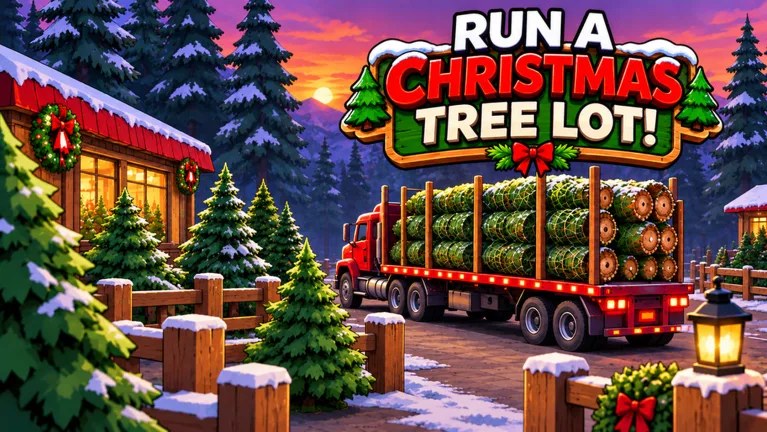 Image: Roblox / Mr. Grinchmas
- Use the computer and open the tree-ordering options. Browse the available varieties before spending your cash.
- Add trees to your order. Check the demand information in Tree Supply while choosing your stock.
- Place the order and wait for delivery. Keep serving customers while your next shipment is on its way.
- Carry the delivered trees onto the lot. Group matching species together as you place them.
- Complete a customer’s purchase and load their tree into their car.
Start with a mix of available varieties instead of spending your entire balance on one species. Then adjust your next order around what customers are buying and which trees remain on display.
Check your remaining inventory before ordering again. A tree marked as being in high demand can still take up plenty of space if you already bought a large shipment. Restock the gaps in your selection before adding more of something that already fills a whole section.
Also check your quests before placing an order. Tree-selling objectives can give you another reason to stock a particular variety, along with extra rewards for completing the task.
Delivery and Earnings Upgrades
Once orders and customer purchases start overlapping, hire workers to help run the business. Keep enough cash available for replacement stock while deciding whether to add staff or expand your display area.
Two optional game passes directly affect deliveries and tree earnings:
- Instant Delivery — 149 Robux: The supplier truck leaves as soon as you place an order.
- 2x Cash — 99 Robux: Doubles the profit on every tree you sell.
Choose Instant Delivery if you want to remove the wait before the supplier truck heads out. You still need to stock the trees after they arrive.
If you use a timed cash boost, prepare your inventory before activating it. MISTLETOE grants 2x Cash for 30 minutes; fill empty display sections and finish placing your shipment so you can spend that window serving customers.
For extra inventory money, redeem IMBROKE for $25,000 Cash, BUDDYTHEELF for $10,000 Cash, and SNOWBALL for $10,000 Cash. Put those rewards toward the varieties you need to restock, or use the money to hire workers and expand the lot.
To enter a code, load into your lot and click the Menu button on the right side of the screen. Open the Codes tab, then type or paste the code into the box exactly as written, including capital letters. Double-check the spelling if your entry does not work.
Another optional purchase is VIP, priced at 199 Robux. Its customers pay up to 15% more and leave happier reviews, and the pass includes a gold VIP chat tag. The separate 2x Reputation pass costs 79 Robux and doubles the reputation earned from every happy customer.
Continue with
 Run a Christmas Tree Lot Trees Guide: Stock and SellUse Run a Christmas Tree Lot trees guide to order stock, choose tree types, manage demand, and keep sales moving while you expand your festive business.
More in Trees
Run a Christmas Tree Lot Order Trees: Stocking Guide
Run a Christmas Tree Lot order trees guide: learn how to use the computer, receive deliveries, stock your lot, and keep cash ready for your next shipment.
Run a Christmas Tree Lot Stock Trees: Restock Guide
Run a Christmas Tree Lot stock trees guide: order deliveries, fill your lot, manage cash, and choose upgrades that keep your Christmas tree shop moving.
Run a Christmas Tree Lot Tree Delivery: Stocking Guide
Master Run a Christmas Tree Lot tree delivery: order stock, handle incoming trees, load customer cars, and learn what the Instant Delivery pass offers.
Continue exploring

Run a Christmas Tree Lot Reputation: How to Earn More
Grow your Run a Christmas Tree Lot reputation with happy customers, free reward codes, and reputation boosts. Learn how to keep sales moving as you expand.
Run a Christmas Tree Lot Sales Guide: Earn More Cash
Use this Run a Christmas Tree Lot sales guide to keep trees stocked, manage workers, fix checkout delays, and invest in upgrades that support more sales.
Join the community
Official channels for news, updates and player help: