Run a Christmas Tree Lot Roblox: Complete Starter Guide
Run a Christmas Tree Lot Roblox guide to stocking trees, hiring workers, expanding your business, redeeming codes, and preparing for festive live events.
Jump to
What Is Run a Christmas Tree Lot?
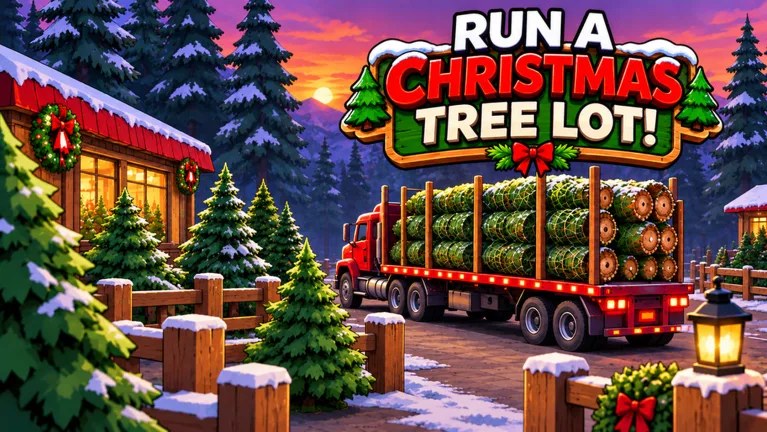
Your Christmas business starts with trees to unload and customers to serve. Run a Christmas Tree Lot Roblox puts you in charge of ordering inventory, completing sales, and reinvesting your earnings. Keep those jobs moving so you can afford workers, expand your space, and decorate beyond the basics.
The tycoon loop stays hands-on early: order trees through your computer, place the deliveries around your lot, handle checkout, and carry purchased trees to customers’ cars. Hiring employees gives you help with those tasks as the business grows.
A few details to know before jumping in:
- Servers hold up to 6 players.
- Workers can help operate your business.
- Lot expansions and upgrades give you more room to grow.
Play Run a Christmas Tree Lot on Roblox to start your business.
How to Order Trees and Complete Your First Sales
Start by learning the full sales routine before spending heavily on expansion. An impressive lot still needs inventory and completed orders to earn cash.

- Use the computer to order trees. Add your chosen trees to the order and place it.
- Wait for the delivery truck. Your stock arrives by truck.
- Unload and place the trees. Arrange them around your lot so customers can browse.
- Handle checkout when a shopper chooses a tree.
- Carry the purchased tree to the customer’s car. Loading it completes the service routine.
Order a mix of tree types instead of spending everything on one variety. Customers browse your selection, and some can leave without choosing anything. Check the demand information in Tree Supply when planning your next order.
Group matching varieties together and leave a walking route through the lot. That makes it easier to find trees while you move between deliveries, checkout, and parked cars.
Keep some cash available for restocking. Spending your entire balance on decorations or a large upgrade leaves less flexibility when your inventory starts thinning out.
Claim Quest Rewards Along the Way
Quests include objectives tied to selling trees, giving you another reason to keep serving customers while building up the business.
Check your quest progress between deliveries and claim completed rewards. Put that extra cash toward your next stock order or employee rather than letting the sales floor run empty.
Hire Workers and Expand Around Your Bottlenecks
Employees can take over parts of the work, including cashier duties, carrying purchases, and sorting trees. Use them to relieve the task that keeps pulling you away from everything else.
If checkout keeps you pinned to the register, consider a cashier. If carrying purchases prevents you from unloading deliveries, put your next hire toward that work. Keep enough money for inventory after hiring so your new employee has customers to help.
Workers also take breaks. When someone stops working, check their status and resting area before hiring another employee to cover the same job.
Plan for Cash and Reputation Requirements
Cash is only part of progression. Lot and headquarters upgrades can also require Reputation, so a healthy balance alone does not guarantee that your next upgrade is ready.
Check the requirements before saving toward a particular expansion. Continue completing customer orders while building your funds, since happy customers contribute Reputation.
Parking, lot space, and headquarters upgrades all appear in the business’s progression. Expand around the problem you actually face:
- Add parking capacity when you need room for more arriving cars.
- Expand the lot when your tree displays need more space.
- Check headquarters requirements when planning your next stage of development.
Decorations include paths, lighting, furniture, a snow machine, and a Santa sled. Leave room around displays and work areas when placing them, especially if you are already planning another expansion.
Codes for Cash, Reputation, and Boosts
These codes offer starting funds, Reputation, timed bonuses, and a collectible:
| Code | Reward |
|---|---|
| IMBROKE | $25,000 Cash |
| BUDDYTHEELF | $10,000 Cash |
| SNOWBALL | $10,000 Cash |
| HOHOHO | 4,000 Reputation |
| JINGLEBELLS | 1,000 Reputation |
| MISTLETOE | 2x Cash for 30 minutes |
| NICELIST | 2x Reputation for 10 minutes |
| OGTICKET | OG Golden Plaque |
The three Cash codes total $45,000, giving you money for inventory, employees, and upgrades. Keep part of that balance available for future deliveries instead of immediately spending it all on expanding.
CHRISTMAS and SANTA250 are expired codes.
How to Redeem Codes
- Load into your lot.
- Open Menu on the right side of the screen.
- Select the Codes tab.
- Enter a code exactly as written, including capital letters.
Stock your displays before redeeming timed boosts so you are ready to serve customers during the bonus period. Keep the temporary code rewards separate from the permanent game passes when deciding whether to spend Robux.
Game Pass Prices and Benefits
The paid options cover earnings, Reputation, delivery timing, customer spending, and seasonal rewards:
- 2x Cash — 99 Robux: Doubles the profit on every tree sold.
- 2x Reputation — 79 Robux: Doubles Reputation earned from happy customers.
- Instant Delivery — 149 Robux: Sends the supplier truck out immediately after you place an order.
- VIP — 199 Robux: Customers pay up to 15% more and leave happier reviews; also includes a gold VIP chat tag.
- First Frost — 299 Robux: Unlocks the premium reward row, including exclusive decorations and longer 2× Cash and 2× Reputation boosts at every tier. The Light-up Tree Tunnel is at tier 20, and rewards for tiers already reached unlock immediately.
Read each benefit closely before buying. Instant Delivery changes when the truck departs; its benefit is immediate dispatch after ordering. First Frost unlocks a premium reward track, with the Light-up Tree Tunnel attached to tier 20.
Christmas Events and Community Updates
Seasonal events give the business something beyond its everyday stock-and-sell routine.
Holiday Rush Hour, scheduled for November 8, centered on a 30-minute shopping rush with boosted earnings and Christmas surprises. Some rewards were exclusive to that live event. For shopping-rush events, replenish your trees beforehand so you can spend the busy period completing sales.
Christmas Event Part 2 is scheduled for November 15. It follows Krampus’s capture, introduces the threat of something worse approaching, and calls for tree lots to stand together.
Watch the game’s event notices, the Mr GM Studio Discord, and the Mr. Grinchmas Roblox community for upcoming activities and new code announcements. Use Notify Me on event notices when available so you can plan around the scheduled start.
Continue with
 Run a Christmas Tree Lot Server Size: 6-Player LimitRun a Christmas Tree Lot server size is capped at 6 players. See how many friends fit in one session and plan your group before starting your business.
More in Community
Run a Christmas Tree Lot Game Chat: Tips for Friends
Use Run a Christmas Tree Lot game chat to coordinate tree orders, talk through upgrades, troubleshoot voice audio, and recognize the gold VIP chat tag.

Run a Christmas Tree Lot Play With Friends: Co-Op Guide
Run a Christmas Tree Lot play with friends: learn the six-player server limit, split stocking and customer duties, and plan upgrades for group sessions.
Run a Christmas Tree Lot Player Count: Peak & Growth
Explore Run a Christmas Tree Lot player count, its 32,678-player peak, six-player servers, and recent growth to see how busy this Roblox tycoon has become.
Run a Christmas Tree Lot Roblox Group: Community Guide
Find the Run a Christmas Tree Lot Roblox group and join Mr. Grinchmas. Explore community channels, codes, and tips for running your festive tree business.
Continue exploring
Run a Christmas Tree Lot Solo: How to Run Your Shop
Play Run a Christmas Tree Lot solo with tips for ordering trees, serving customers, hiring workers, and using free codes to keep your business moving.
Run a Christmas Tree Lot Beginner Guide: Start Strong
Run a Christmas Tree Lot beginner guide: learn how to stock trees, serve customers, hire workers, and spend your cash on upgrades that keep sales moving.
Join the community
Official channels for news, updates and player help: